JSON File Format
We use JSON files to store our Solution Kit metadata. We use JSON Schema to design and validate our solution kit metadata. The JSON Schema file can also used as an autocomplete tool within schema-aware text editors. We have also separated CoPilot Concepts information into a separate JSON file.
JSON Schema Standards
File Name Standards
Tools will look in the main directory of each solution kit for the following file name:
solution-kit-metadata.json
The name of the JSON schema to validate the file is called solution-kit-metadata.jschema.
Note that the file extension .jschema is used although the file format is also JSON.
There should only be a single version of that solution-kit-metadata.json file in each solution kit.
If the solution kit is shipped to a customer, the build tool should include both the metadata file
and the schema file to a customer.
Schema Name In JSON Instance
To validate your file and use the auto-suggest functions of your JSON editor, you can specify the schema name as the first property of your file:
Simple Solution Kit Metadata JSON
1 2 3 4 5 6 7 8 | |
JSON with Questions
1 2 3 4 5 6 7 8 9 10 11 12 13 14 15 16 17 18 19 20 21 22 23 24 25 26 | |
Binding a Schema to a JSON file within the oXygen JSON editor
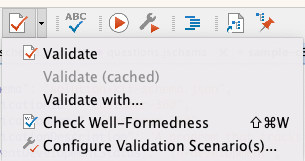
We can also direct the oXygen JSON editor by using the "Red Check" icon on your toolbar:
Using Auto-Complete
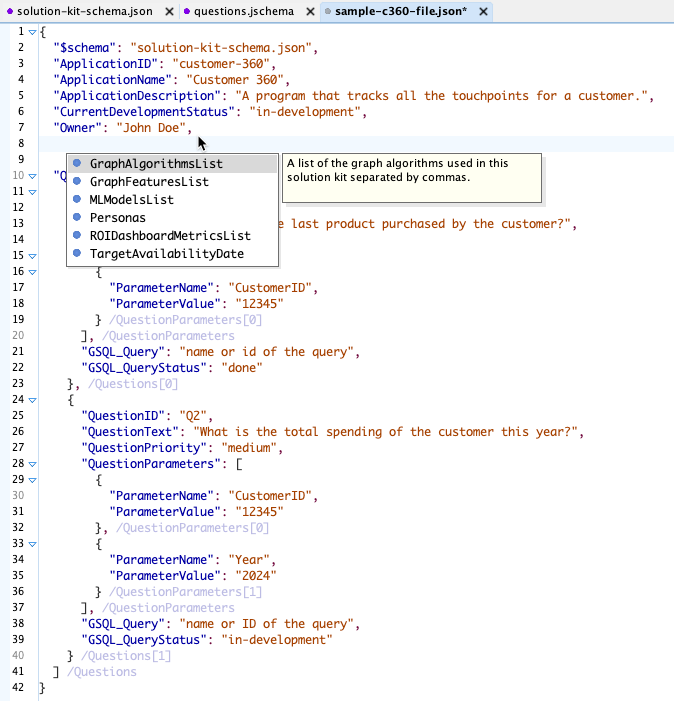
After you associate your JSON instance with the solution kit metadata schema you can enable powerful validation and auto-complete features that suggest the next property or item.
Required Fields
The following fields are required by a solution kit metadata file:
- ApplicationID - This ID should match the directory name and be all lower-case and dashes. Avoid duplicate ids. There are currently no checks for this now.
- ApplicationName - The name of the Solution Kit application such as "Customer 360". You are encouraged to use title case and spaces.
- ApplicationDescription - This is a full-text description of the application in a detailed paragraph format.
- CurrentDevelopmentStatus - The status of the solution kit:
- Owner - The full name of the owner of the solution kit. This is for informational use right now and we don't trigger any events and send e-mails on this field yet, but we could add that also.
Schema Versioning Strategy
In the future, the schema may be versioned, and the version number may appear in the schema file name. This implies that all files that reference the schema might need to be updated, so it should be done with caution.
Note that if we ship a solution kit to the customer, the JSON Schema file should be included in the distribution.